Best AI Meeting Assistants for Action Items and Follow-Up Emails
By Tobias Kimmich

Short answer: Fireflies is the best AI meeting assistant for getting action items into your tools today, with native connections to 13 task tools plus HubSpot and Salesforce. Fathom is the best for sales follow-up, with native HubSpot, Salesforce and Close logging, follow-up email drafts and CRM field sync on Business. Granola is the strongest for follow-up emails that land as Gmail drafts. What almost none of them offer is a single review step where you approve each task, CRM change and email before it runs. That gap is the one to check before you connect anything to your CRM.
Disclosure: Notrilo is our product. It has not launched, so it is not ranked. We describe its planned approve-then-run flow at the end and say plainly where Fireflies and Fathom are ahead today.
What "follow-up" really involves
Every AI note taker can list action items. The work starts after that. A typical external meeting leaves five jobs:
- Create the tasks, with owners and due dates, in the tool your team already uses.
- Log the meeting on the right CRM contact, company and deal.
- Update the CRM fields that changed (stage, next step, close date).
- Send the follow-up email.
- Book the next meeting and file the notes where people will look.
We scored each tool on how many of those it can do natively today, and on the question most reviews skip: does a human confirm before it happens? Automatic sync is fast, but it copies a misheard name or date straight into your CRM. If you want help writing the items themselves, see our guide to writing meeting action items.
The follow-up table
| Tool | Tasks to tools | CRM logging | CRM field updates | Follow-up email | How it runs |
|---|---|---|---|---|---|
| Fireflies | Native: 13 task tools incl. Asana, Jira, Linear, ClickUp, monday.com, Trello, Todoist | Native Salesforce (notes, summaries, transcripts to lead, contact or opportunity; action items become tasks) and HubSpot | Not confirmed; one competitor says sync is one way | Yes | Per integration; Integration Rules choose which meetings sync (Business) |
| Fathom | Native Asana (one click); others via Zapier or Make | Native HubSpot, Salesforce, Close: summaries, action items, links | Field sync on Business | Yes, Premium and up | CRM sync for up to 3 users per domain below Business |
| Otter | Native Jira via account manager; AI Chat "Work" mode creates Jira tickets (Enterprise) | Native Salesforce and HubSpot, auto sync (Pro and up) | Not documented | Gmail drafts via AI Chat (Enterprise) | Auto sync for CRM; you ask AI Chat for other actions |
| Granola | Zapier only | Native HubSpot (Business), Attio, Affinity; Salesforce on Enterprise | Not documented | Yes, as Gmail drafts | Drafts for you to send |
| tl;dv | Native Trello and monday.com; Jira named on homepage | Native HubSpot (properties, activity, tasks), Salesforce, Pipedrive, Zoho, Salesloft | Field sync on Business | Not native (its MCP server can draft) | Workflows, team-wide on paid teams |
| Notion | Skills create follow-up tasks inside Notion; Custom Agents run on "meeting note summarized" (Business) | None native | None | Agents can send next steps | Agent rules you set |
| Notta | Native ClickUp; others via Zapier | 7 native CRMs incl. HubSpot and Salesforce (Business) | Not documented | Notta Brain drafts follow-ups | Credit based |
Sources: Fireflies Salesforce, Fireflies task tools, Fathom HubSpot, Fathom Salesforce, Fathom pricing, Otter AI Chat, Otter Salesforce, Otter HubSpot, Otter Jira, Granola integrations, tl;dv HubSpot, tl;dv workflows, Notion releases, Notta integrations.
Native task connectors, counted
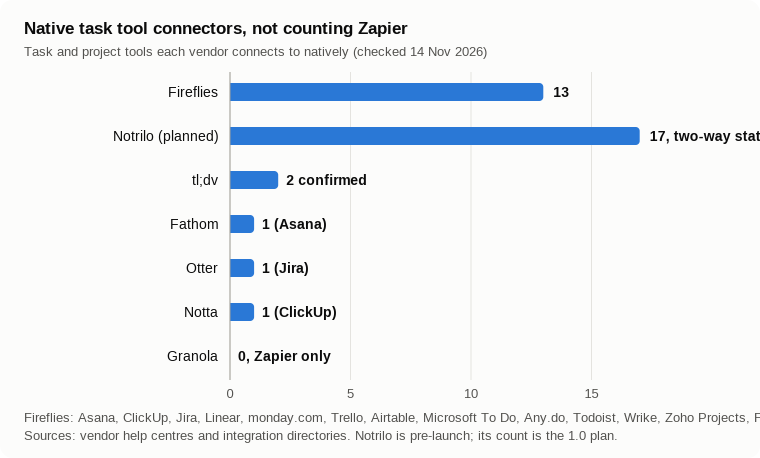
Zapier can connect almost anything to anything, but each zap is one more thing to build, pay for and fix when a field changes. Native connectors usually map owner and due date for you. Here is how many task tools each vendor connects to without Zapier.
| Tool | Native task tools | Which |
|---|---|---|
| Fireflies | 13 | Asana, ClickUp, Jira, Linear, monday.com, Trello, Airtable, Microsoft To Do, Any.do, Todoist, Wrike, Zoho Projects, Flowlu |
| Notrilo (planned) | 17 | Linear, Jira, Asana, ClickUp, monday.com, Trello, Todoist, Microsoft To Do, Google Tasks, Apple Reminders (Mac and iPhone), TickTick, Airtable, Wrike, Zoho Projects, Basecamp, Notion databases, Smartsheet, with two-way status |
| tl;dv | 2 confirmed | Trello, monday.com (Jira named, mechanism not documented) |
| Fathom | 1 | Asana |
| Otter | 1 | Jira (via account manager) |
| Notta | 1 | ClickUp |
| Granola | 0 | All via Zapier |
One more distinction matters: every competitor pushes tasks one way. Once the task is in Jira, closing it there does not update the meeting note. Otter's AI Chat can read and update Jira issues on Enterprise, but its action item push is still one way.
The picks
Fireflies: best for action items into many task tools
Best for operations, product and agency teams whose work lives in Asana, Jira, Linear or ClickUp. No other tool in this group connects natively to as many task tools, and AI Skills outputs can be sent to any connected integration (Fireflies). On Salesforce it sends notes, summaries and transcripts to the lead, contact or opportunity and turns action items into tasks. Watch out: Integration Rules, which control which meetings sync where, need Business, and AI Skills draw on small credit allowances (Claap).
Fathom: best for sales follow-up
Best for account executives and customer success teams. Fathom writes summaries, action items and links to HubSpot contacts, companies and open deals, and to Salesforce contacts, accounts and opportunities, plus Close (Fathom HubSpot). Premium adds AI action items and follow-up emails; Business adds CRM field sync, Deal View and scorecards (Fathom pricing). Since July 2026, Team users can pick which deal a call belongs to (release notes). Watch out: Salesforce logging does not cover leads, and Jira, Linear and Notion need Zapier or Make.
Granola: best follow-up email drafts
Best for founders and consultants whose follow-up is mostly an email. Granola drafts follow-ups into Gmail and logs to HubSpot, Attio and Affinity on Business (Granola help). A draft you edit and send yourself is a natural approval step. Watch out: tasks go to Jira, Linear, Asana and others only through Zapier.
tl;dv: best CRM breadth for European sales teams
Best for sales teams on Pipedrive, Zoho or Salesloft as well as HubSpot and Salesforce. Its HubSpot integration can set properties, log the meeting and create tasks (tl;dv HubSpot). Watch out: team-wide workflows need a paid team, field sync needs Business, and there is no native follow-up email.
Otter: best if you are already on Otter Enterprise
Otter's AI Chat "Work" mode can create Jira tickets, Notion pages, Drive files and Gmail drafts when you ask it to, which is closer to an assistant than a sync (Otter AI Chat). Watch out: those connectors are Enterprise only (Otter pricing).
Notion and Notta
Notion is best when the tasks should stay in Notion: after a meeting it can create follow-up tasks, and Custom Agents can run when a summary is ready (Notion releases). It does not write to a CRM. Notta pairs 7 native CRMs with Notta Brain, which drafts follow-up emails and Slack messages on credits (Notta).
Notrilo: approve, then it runs (planned)
Notrilo is our product and is not available yet. Its 1.0 plan, called "Do it", is built around the gap in the table above: one review step for all five follow-up jobs (Notrilo Done).
After a meeting, Notrilo proposes the work as a short list, each item cited to the moment it was said:
- create Jira, Linear, Asana, ClickUp, Monday.com or Trello tasks with owner and due date, with two-way status for Jira and Linear, so closing the issue updates the note;
- log the note to HubSpot or Salesforce and propose field changes (stage, next step, close date), keeping the old value for undo;
- draft the follow-up email in each recipient's language;
- book the next meeting with the attendees;
- file the note in Notion or Confluence.
You review and edit each one, then approve it. Nothing runs unapproved: there is no auto send, no bulk approve by default, and no email goes to attendees until you press Send. Each action shows its result with a link, offers undo where the tool allows it, and writes an audit record.
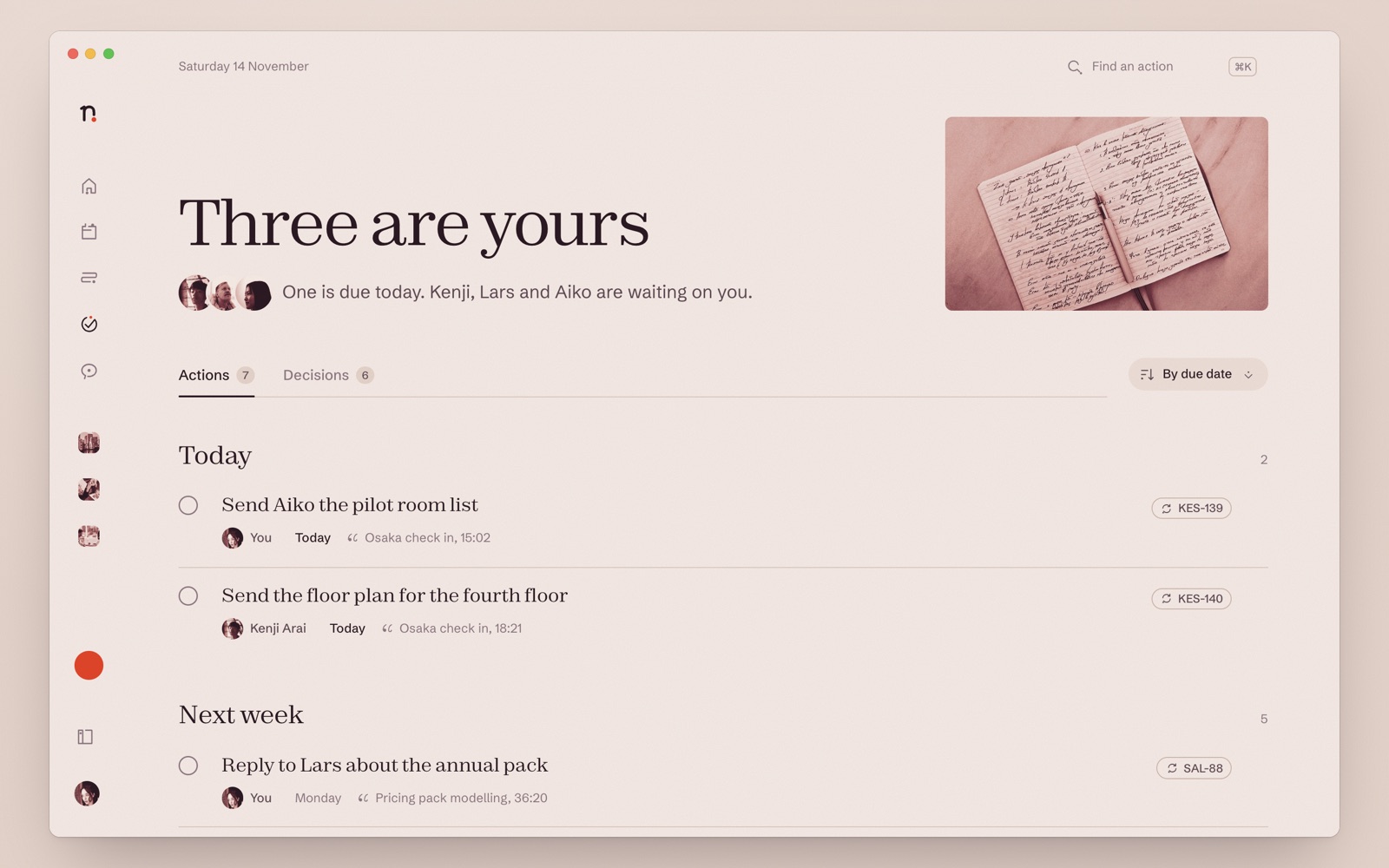 Notrilo design preview, pre-launch.
Where Fireflies and Fathom lead today, honestly: they are live, and their CRM integrations have years of real use behind them. Fathom adds Deal View, coaching metrics and AI scorecards; Notrilo will not build scorecards or coaching scores at all, because we do not score people. On task tools we plan 17 against its 13, so we are level or ahead on count, but most of ours have not yet run against the real services and Fireflies connectors are live today. Fireflies also covers more CRMs than our two. If your team needs Pipedrive, Close, Zoho or deal coaching, choose one of them.
Before you connect a CRM: a short checklist
- Run five real meetings first with the integration off. Read the action items. If owners or dates are wrong more than occasionally, do not automate yet.
- Pick the record rule. Decide whether a call logs to the contact, the company, the deal or all three, and check the tool supports that (Fathom's Salesforce sync skips leads, for example).
- Start with a sandbox or a test deal, and check what the integration overwrites.
- Limit who can connect it. On team plans, ask whether admins can restrict integrations.
- Keep a human on emails to customers. A draft is fine; an automatic send is a risk. Our follow-up email templates help with tone.
Related guides
- How to write meeting action items, with 40 examples.
- Best AI note takers for Notion, Slack, Jira and Linear, native vs Zapier.
- Real cost at 5, 10 and 25 seats, including CRM plan gates.
- The 12 best AI meeting note takers in 2026.
- How Notrilo handles follow-up.
FAQ
Which AI meeting assistant is best for action items?
For pushing action items into task tools, Fireflies: it connects natively to 13 task and project tools, including Asana, Jira, Linear, ClickUp, monday.com and Trello. For sales teams that need notes and action items in HubSpot or Salesforce, Fathom and Fireflies lead today.
Can an AI meeting assistant write my follow-up email?
Yes. Fathom Premium, Granola and Fireflies draft follow-up emails, Granola can place drafts in Gmail, Notta Brain writes them, and Otter can draft Gmail messages through AI Chat on Enterprise. Read every draft before sending: a summary can misstate who agreed to what.
Does Fathom or Fireflies update CRM fields automatically?
Fathom logs summaries, action items and links to HubSpot and Salesforce records, and CRM field sync is on its Business plan. Fireflies sends notes, summaries and transcripts to Salesforce leads, contacts or opportunities and turns action items into tasks; its Integration Rules, which control which meetings sync, need Business.
Should meeting action items sync automatically?
Automatic sync is fastest but copies mistakes as fast as it copies tasks. A wrong owner or a misheard date in a summary becomes a wrong task in Jira or a wrong field in the CRM. Teams with external customers usually do better with a quick review step before anything leaves the note.
Which tools sync action items with Jira and Linear natively?
Fireflies connects natively to both. Otter sends action items to Jira through an account manager setup. Granola, Fathom and Notta reach Jira and Linear only through Zapier. Notion reads Jira and Linear as AI connectors on Business.