The 12 Best AI Meeting Note Takers in 2026
By Tobias Kimmich

Short answer: pick by the job, not the brand. Granola is the best bot-free note taker for English meetings on a laptop. Fathom has the best free plan. Fireflies connects to the most tools. tl;dv is the safest choice for EU data with no training on your meetings. Otter covers the most devices and platforms. If you already pay for Zoom, Microsoft 365 Copilot or Google Workspace, try the notes built into your meeting app before you buy anything. None of the twelve handles live translation in a mixed-language meeting well yet, which is the gap our own product is built for.
Disclosure: Notrilo is our product. It has not launched, so it is not in the ranking. It appears in its own column on the scoreboard, marked as planned, and in a separate section near the end. Every competitor is described from its own documentation, including where it beats what we plan to ship.
The verdict by use case
| If you need | Pick | Why |
|---|---|---|
| Clean notes on your laptop, no bot | Granola | Records device audio in any meeting app, enhances your own typed notes (Granola help) |
| The most you can get for free | Fathom | Unlimited recording, transcripts and storage on Free (Fathom pricing) |
| Notes pushed into many tools | Fireflies | Native Notion, Confluence, Drive, OneDrive, 11 task tools, Zapier and n8n (Fireflies integrations) |
| EU data and no training | tl;dv or Jamie | EU data centres and a no-training policy on standard plans (tl;dv, Jamie) |
| Every device and platform | Otter | Bot, bot-free desktop, Chrome extension, iPhone, Android and web (Otter pricing) |
| Notes inside your wiki | Notion | Notes land as pages in your Notion workspace, on Business (Notion pricing) |
| Lowest paid price, many languages | Notta | Pro from $8.17 a month billed yearly, 58 languages (Notta pricing) |
| Your team lives in Teams | Microsoft Copilot | Built into Teams, with multilingual speech recognition for licensed organizers |
| Mixed languages in one meeting, live captions per person | None of the twelve fully. See the multilingual guide |
How we compared them
We did not run a scored listening test for this version, and we will not pretend we did. What we did:
- Read each vendor's help center, pricing page and security page, and recorded only what the vendor documents. Seven of the twelve have a full dated profile in our research file; the other five were checked directly on the vendor's page.
- Scored six capabilities that decide most buying choices: whether a bot joins the call, mixed languages in one meeting, live translated captions, EU hosting below the top tier, training on your data, and uploading a past recording.
- Marked anything the vendor does not document as "not documented", not as "no". A question mark is a gap in the documentation, not a verdict.
The scoreboard below is that dataset in one picture.
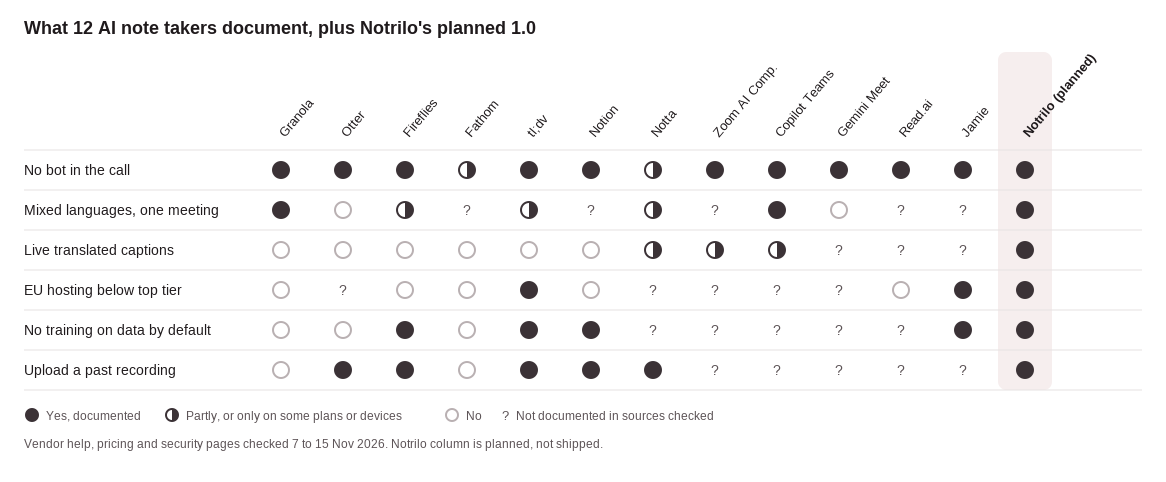
Three things stand out:
- "No bot" is now normal. Every one of the twelve can take notes without a visible bot, at least on some devices. Fathom's bot-free mode is Mac first, with Windows in limited alpha (Fathom 3.0 help), and Notta's desktop app is still labelled beta (Notta).
- Live translation is the empty row. Only Notta (as a metered add-on), Zoom and Teams (with paid licences) document translated captions. The dedicated note takers mostly translate after the meeting, if at all.
- Privacy defaults split the field. Fireflies, tl;dv, Notion and Jamie say they never train on your data. Granola, Fathom and Otter train their own models on anonymised or de-identified data by default (Granola FAQ, Fathom security, Otter privacy).
The 12 best AI meeting note takers
1. Granola: best bot-free note taker for laptop meetings
Granola never sends a bot. The Mac and Windows apps capture your device audio in Zoom, Meet, Teams or any other app, and you type rough notes that Granola writes up from the transcript (Granola help). It reads speaker names from the Zoom, Meet and Teams desktop apps. Its iPhone app has 5.0 stars from 15,000 ratings (App Store).
Where it falls short: it keeps no audio or video, accepts no uploads, and its transcripts cannot be edited. Data is stored in the US only, and on Basic and Business anonymised data trains Granola's own models unless each user opts out (Granola FAQ). The free plan shows only the last 30 days of notes.
Price: Basic free; Business $14 per user per month; Enterprise $35 (Granola pricing).
Best for: people who want to stay present in English meetings on a laptop and dislike bots.
2. Fathom: best free plan
Fathom's free plan records and transcribes without limits and keeps everything, with advanced summaries on the first 5 calls each month (Fathom pricing). It offers both a bot and, since version 3.0, bot-free video recording on Mac. Sales teams get native HubSpot, Salesforce and Close sync, and builders get an API, webhooks and an MCP server on every plan.
Where it falls short: no Webex, no phone calls, no file upload. Teams capture relies on a bot that joins as an anonymous guest and can sit in the lobby. Data is US only, and Fathom uses de-identified data for its own models unless you opt out (Fathom security). Superhuman announced it was acquiring Fathom in September 2026 (Superhuman).
Price: Free; Premium $16 a month billed yearly; Team $15 per seat yearly with 2 seats minimum; Business $25.
Best for: individuals and sales teams with English calls on Zoom, Meet or Teams.
3. Fireflies: best for integrations
Fireflies claims 240+ integrations and backs much of it with native connectors: Notion, Confluence Cloud, Google Drive, OneDrive, Slack, Teams channels, Salesforce, HubSpot and 11 task tools. Zapier and its MCP server work on every plan, and it has a verified n8n node. It says meeting data is never used to train models (Fireflies policy). Its desktop app records without a bot and turns on three consent notices by default: a spoken message, a chat message on Mac and an "AI Taking Notes" camera watermark (Fireflies help).
Where it falls short: in bot-free mode speakers show as "Speaker 1" and "Speaker 2" and no audio file is kept. AI features run on small credit grants. Multi-Language Mode is limited to Business and Enterprise, and the summary is written in the meeting's dominant language (Fireflies Multi-Language Mode).
Price: Free (400 lifetime minutes); Pro $10 a month billed yearly; Business $19 (third-party figures citing the Fireflies pricing page, Claap).
Best for: operations and revenue teams that want notes to land in many systems automatically.
4. Otter: best coverage across devices
Otter has the widest set of capture routes: a named bot for Zoom, Meet and Teams, a bot-free desktop app on Mac and Windows, a Chrome extension, iPhone and Android apps, and file upload up to 5 GB. Its iPhone app has 4.8 stars from 89,000 ratings. Pre-meeting consent emails and admin-locked auto-join rules are mature.
Where it falls short: 17 transcription languages, one language per conversation (Otter languages), and no live translation. Basic stops each conversation at 30 minutes. Otter trains on de-identified data, and it faces a consolidated class action over recording non-users, whose core claims survived dismissal in August 2026 (NPR).
Price: Basic free; Pro $8.33 a month billed yearly; Business $19.99 (Otter pricing).
Best for: English speakers who record on phone and laptop and want one familiar app.
5. tl;dv: best EU-hosted option for sales teams
tl;dv is a German company with data centres in Europe, a choice of EU or US AI hosting, and a plain "No customer data is used to train the AI" policy (tl;dv security). It records video with a bot, audio without one, and pushes notes natively to HubSpot, Salesforce, Pipedrive, Notion and more.
Where it falls short: its bot-free mode is audio only and records every sound on your computer, and consent is left to you (tl;dv help). Mixed-language meetings and custom vocabulary are on Business. Free limits are lifetime, not monthly.
Price: Free; Pro EUR 18 a month billed yearly; Business EUR 29 (tl;dv pricing).
Best for: European sales and customer teams that want video, CRM sync and EU hosting.
6. Notion AI Meeting Notes: best if your team already lives in Notion
Notion records on your device with no bot and files each meeting as a page in a meetings database, linked to the rest of your workspace. Custom Agents can act when a summary is ready. Notion says customer data is never used to train models, and it holds SOC 2, ISO 27001, ISO 27701 and ISO 27018 (Notion help).
Where it falls short: 16 transcription languages, speaker labels in English only, and mobile and browser capture use the microphone only. Ongoing use needs the Business plan, EUR 19.50 per member per month; Free and Plus get a trial (Notion pricing).
Best for: teams whose projects, docs and tasks are already in Notion.
7. Notta: best low price with many languages
Notta transcribes 58 languages, translates transcripts into 42, and is one of the few tools with real-time translation, as a metered add-on. Its desktop app has a Privacy Mode that transcribes on the device in English, Japanese, Korean, Cantonese and Simplified Chinese. It is strong in Japan.
Where it falls short: Free stops each recording at 3 minutes. No public API, webhooks or MCP server. Notta does not publish a data region or a clear training policy outside Google Workspace data (Notta pricing).
Price: Free; Pro $8.17 a month billed yearly; Business $16.67.
Best for: price-conscious users in Japan and Asia who need many languages.
8. Zoom AI Companion: best if every meeting is on Zoom
Zoom includes AI Companion at no additional cost with paid Zoom Workplace plans (Zoom). It writes summaries without any extra app, and Zoom says summaries cover 36 languages in preview and can follow the main language spoken (Zoom news).
Where it falls short: your notes stay inside Zoom, and support for in-person, Teams and Meet meetings arrived only with AI Companion 3.0. Users on Zoom's community forum report summaries in the wrong language when caption settings differ (Zoom Community).
Best for: companies that already pay for Zoom and run nearly every meeting there.
9. Microsoft Copilot in Teams: best for Microsoft 365 companies
Copilot's Facilitator writes live notes, decisions and open questions inside Teams meetings. Teams also supports multilingual speech recognition: when the organizer has Teams Premium or a Microsoft 365 Copilot licence, each participant can set their own spoken language (Microsoft support). That is one of the few real answers to mixed-language calls among the big platforms.
Where it falls short: it is an add-on on top of Microsoft 365, listed at $21 per user per month billed yearly, with a promotional $18 until 31 December 2026 (Microsoft 365 Copilot pricing). It does little for meetings outside Teams. Our Teams guide covers when Copilot is enough.
Best for: Microsoft 365 organisations that run most meetings in Teams.
10. Gemini in Google Meet: best zero-setup notes for Workspace
"Take notes for me" writes notes into a Google Doc and emails the organizer, with no install. It covers English, French, German, Italian, Japanese, Korean, Portuguese and Spanish (Google Meet help).
Where it falls short: Google says it supports one language at a time, so a meeting that switches language breaks it. It needs an eligible Workspace edition or Google AI plan, and only works in Meet.
Best for: Google Workspace teams with single-language Meet calls.
11. Read.ai: best for meeting analytics
Read.ai adds engagement and sentiment reports and coaching trends on top of notes, with Mac, Windows, iPhone and Android apps on every plan (Read.ai pricing).
Where it falls short: EU and Canada hosting, SSO and SCIM are only on Enterprise+, which needs 5 or more licences. Meeting reports list 16 languages. Scoring how engaged people are can feel like surveillance to the people being scored.
Price: Free (5 meetings a month, 1 hour each); Pro $15 a month billed yearly; Enterprise+ $29.75.
Best for: managers who want meeting metrics as well as notes.
12. Jamie: best bot-free option with EU hosting
Jamie records from your device with no bot, hosts data in the EU, holds ISO 27001, and says it does not train on your data on any plan (Jamie pricing). It lists notes and transcripts in 99+ languages and works for in-person meetings.
Where it falls short: it is expensive for individuals (Pro EUR 39 a month billed yearly), Free caps meetings at 30 minutes and 10 notes a month, and SOC 2 Type II is still listed as pending.
Best for: European professionals in finance, law and consulting who want privacy first.
What each one costs
Most individual plans with AI notes now cost between $8 and $16 a month billed yearly. The chart shows the cheapest paid tier for the tools that publish one.
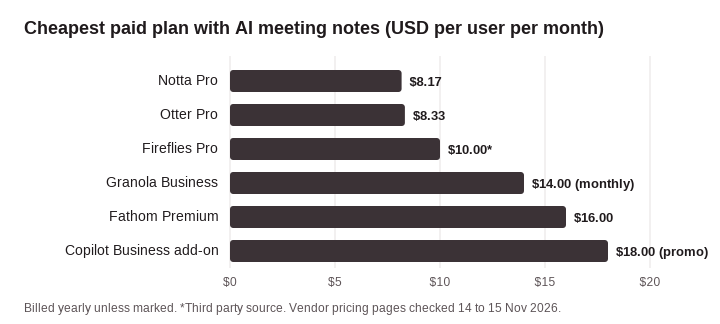
| Plan | USD per user per month |
|---|---|
| Notta Pro (yearly) | $8.17 |
| Otter Pro (yearly) | $8.33 |
| Fireflies Pro (yearly, third-party source) | $10 |
| Granola Business (monthly) | $14 |
| Fathom Premium (yearly) | $16 |
| Copilot Business add-on (yearly, promo to 31 Dec 2026) | $18 |
The price on the card is rarely the real cost for a team. Seat minimums, AI credits and features held back for higher tiers change the total. Our small team cost guide works out the bill at 5, 10 and 25 seats, and the free plans guide shows where each free tier runs out.
Which kind of note taker do you need?
Start with where your meetings happen, then narrow by what you must not compromise on.
- All meetings on one platform? Try Zoom AI Companion, Copilot or Gemini first. You may already pay for it.
- Meetings across Zoom, Teams, Meet and in person? You need a separate note taker. If a bot is unwelcome, go bot-free: see our bot-free guide.
- Data must stay in the EU or must not train models? That narrows the list to tl;dv, Jamie and Notion Enterprise among shipping products. Our GDPR guide checks each claim.
- More than one language in the room? Most tools assume one language per meeting. Read the multilingual and non-English guides before you buy.
- Notes must end up in Notion, Jira or Slack? Check native connectors, not Zapier recipes: see integrations.
- Unsure if you need AI at all? Compare AI note takers with Notion, Apple Notes and OneNote in our meeting notes app guide.
Where Notrilo fits (launching)
Notrilo is our product, and it is not available yet. This is what version 1.0 is built to do, from our product plan. We will list each feature as live only when it ships.
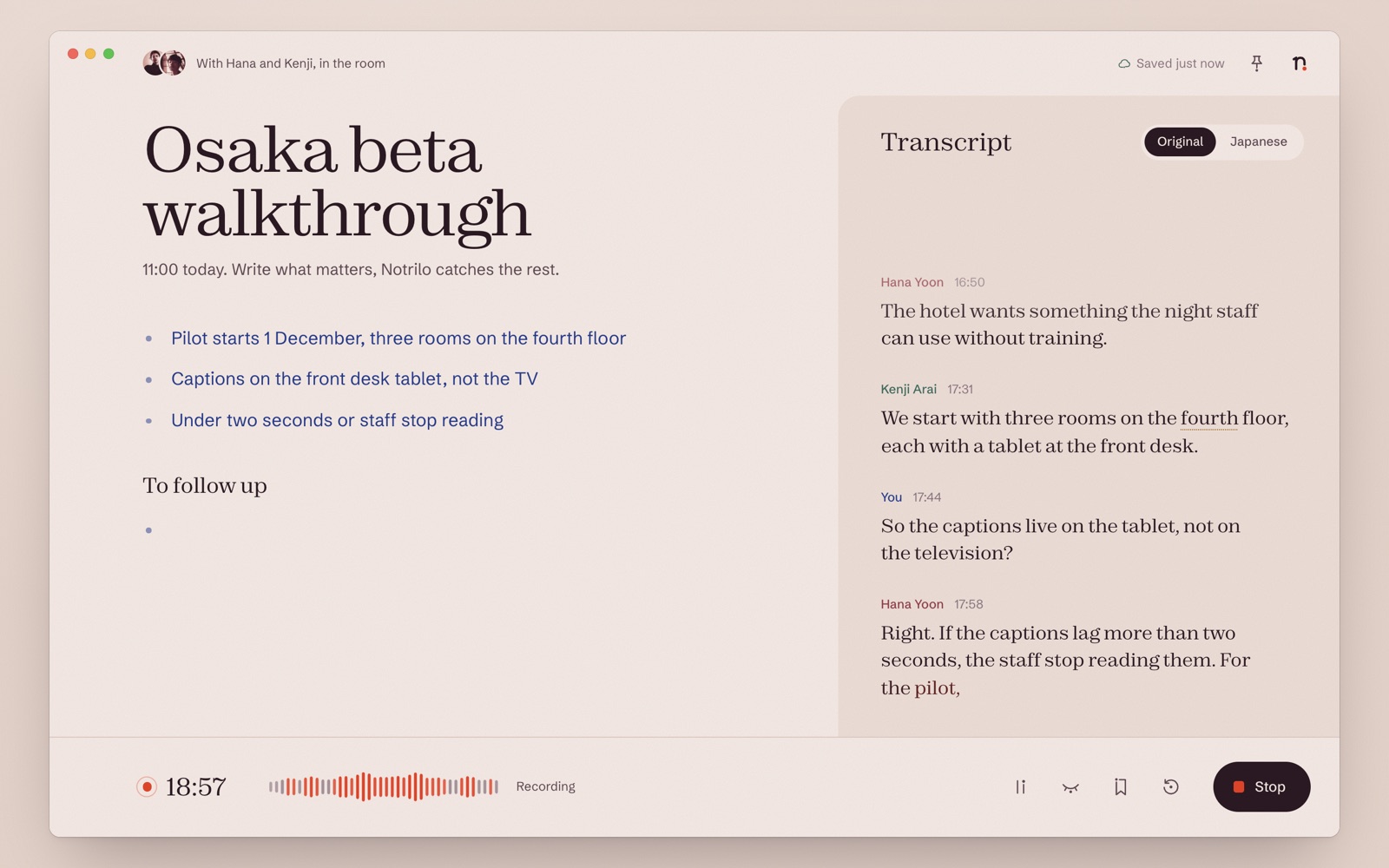 Notrilo design preview, pre-launch.
The rows where we aim to lead are the three the scoreboard shows as thin today:
- Every language in the room. Language is detected per segment, so a meeting that moves between German and English stays mixed in the transcript. Each Notrilo user can turn on live captions translated into their own language, on calls and across a table, and notes are written natively in each reader's language rather than translated from English.
- In person. Room mode on every platform, a face to face mode where two people share one phone or laptop with a split screen, each half in its own language, saved as a note (offline translation is planned on Mac and iPhone for the pairs the device supports), and speaker names in the room only for people who have opted in with their own voice. Our in-person guide covers the competition here.
- Trust. Consent notices that follow the strictest rule for the people in the meeting, a page where any participant can see what was captured and ask to be removed, EU or US data residency chosen at signup on every plan including Free, and no training on your data unless you opt in. See how we handle trust.
Where competitors stay ahead of our 1.0: we launch without a SOC 2 report, which all seven specialist tools we profiled in depth (Granola, Otter, Fireflies, Fathom, tl;dv, Notion, Notta) already hold. Fireflies has a far larger integration catalogue. Fathom, tl;dv and Otter offer sales coaching and scorecards, which we will not build. Granola's note-first writing experience has years of polish. If any of those matter most to you, choose them. Pricing for our plans is on the pricing page.
How to test a note taker yourself in one week
Vendor demos are recorded in quiet rooms by native speakers. Before you commit a team, run this test. It is the protocol we will use for the scored version of this article.
- Pick two finalists from the verdict table.
- Record the same three meetings with both at once: one video call, one in-person meeting at a table, and one with an accent or language your team actually uses.
- Count errors on names and numbers in a two-minute stretch of each transcript. These are the errors that cause damage in follow-ups.
- Check every action item in the summary against the recording. Mark any line that has no support in what was said.
- Ask one person who was in the meeting whether they knew they were being recorded and how. If the answer is "no", the tool's consent flow failed.
- Look at the settings on day one: training opt-out, data region, retention, and who can see shared notes.
Related guides
- Best free AI note takers
- Best AI note takers for Mac and for Windows
- Best AI note taker apps for iPhone and for Android
- Best AI note takers for Zoom and for Google Meet
- Most private AI note takers
- Best AI meeting assistants for action items and follow-up emails
- Best apps to transcribe and summarise a recording you already have
- What Notrilo captures, and how
FAQ
What is the best AI meeting note taker in 2026?
There is no single best one. Granola is the best bot-free note taker for English meetings on a Mac or Windows laptop. Fathom has the most generous free plan. Fireflies has the widest integrations. tl;dv is the strongest EU-hosted option with no training on your data. If your company already pays for Zoom, Microsoft 365 Copilot or an eligible Google Workspace plan, try the built-in notes first.
Which AI note taker does not join the call as a bot?
Granola and Notion only record from your own device. Otter, Fireflies, tl;dv, Notta and Fathom offer both a bot and a bot-free desktop app; Fathom's bot-free mode is Mac first, with Windows in limited alpha.
Which AI note taker is best for meetings in more than one language?
Few handle two languages in one meeting. Granola's desktop app can transcribe mixed languages, Fireflies has a Multi-Language Mode on Business and Enterprise, and Teams supports multilingual speech recognition when the organizer has Teams Premium or Microsoft 365 Copilot. Otter and Gemini in Google Meet work in one language per meeting.
Do AI note takers train on my meetings?
Some do by default. Granola and Fathom use anonymised or de-identified data to improve their own models unless you opt out, and Otter trains on de-identified data. Fireflies, tl;dv, Notion and Jamie say they do not train on customer data.
Is the AI note taker built into Zoom, Teams or Meet good enough?
Often, if all your meetings happen on that one platform. Zoom AI Companion is included with paid Zoom Workplace plans, Copilot in Teams needs a Copilot licence, and Gemini in Meet needs an eligible Workspace or Google AI plan and works in one language at a time. A separate note taker earns its cost when you meet across platforms, in person, or in several languages.